

Importing from Canva
Import a Canva design by pasting its public view link — not the edit link, which requires being signed in as the designer.
- Open the design in Canva.
- Click
Sharein the top right. - Choose
More→ Public view link. - Paste that link into buildonce.app's import dialog.
canva.link/… share link works the same as the full public view link.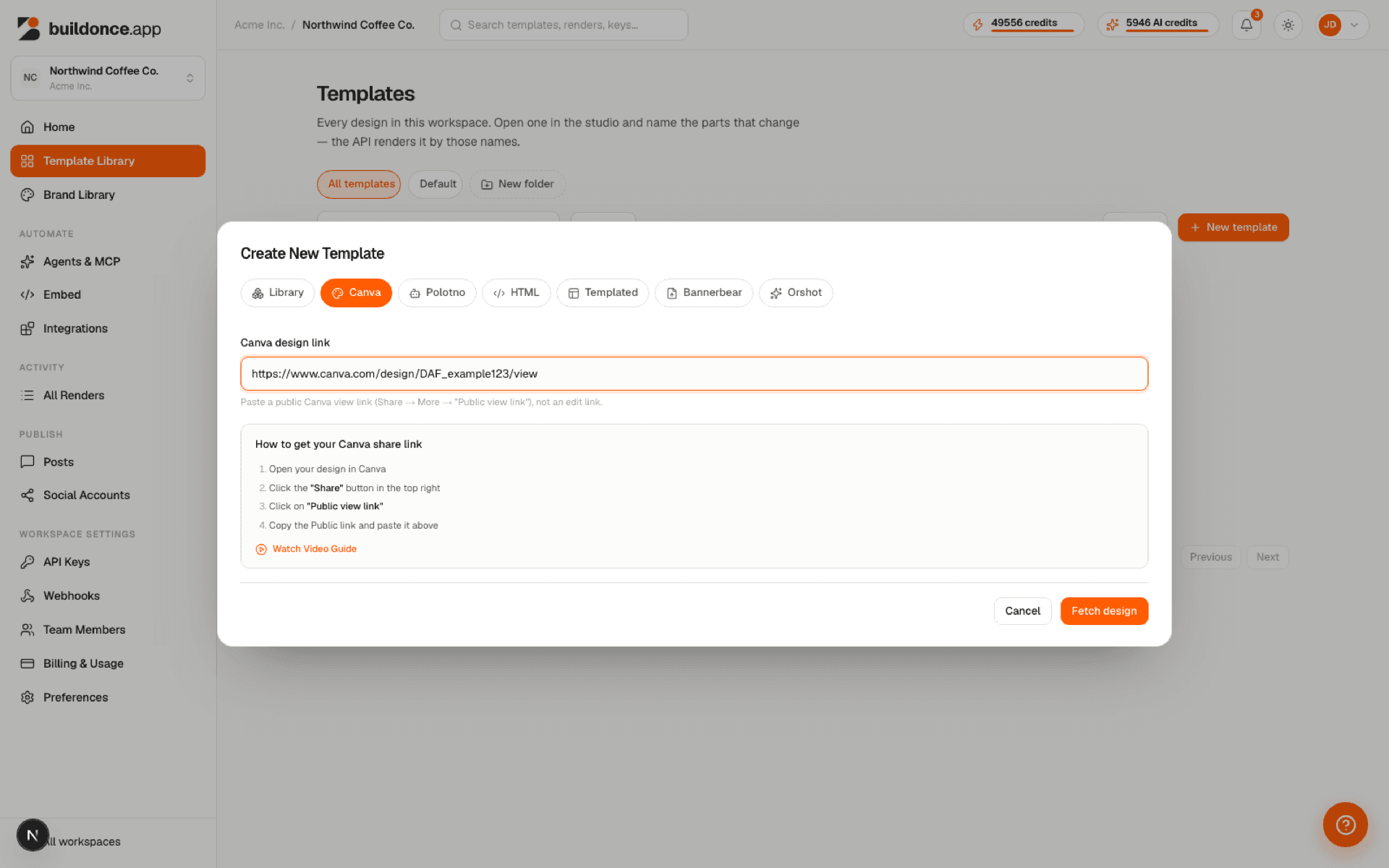
Text layers, images, and vector shapes (borders, icons, decorative graphics) all carry over, including each text layer's font, size, weight, color and spacing. Layers import as plain editable objects — they don't become template variables automatically; mark the ones you need afterward in the studio's Properties panel.
Exporting from inside Canva
The Canva App “Export to BuildOnce” is a separate path from pasting a link: it runs inside Canva's own editor and sends the open design straight into a new buildonce.app template, with every page carried over automatically and no preview/confirm step.
- Install or open the BuildOnce app from within Canva's editor.
- Configure it with an buildonce.app API key for the workspace you want to import into.
- Use the app's export action to send the current design to buildonce.app.
Under the hood the app calls POST /v1/canva-app/import with your API key (X-Api-Key, template:write scope) plus a Canva-issued token proving the call came from inside Canva's editor. This route exists only for the Canva App itself — it isn't a general-purpose import endpoint, so it isn't documented further in the API reference.
Was this page helpful?